 Hallways
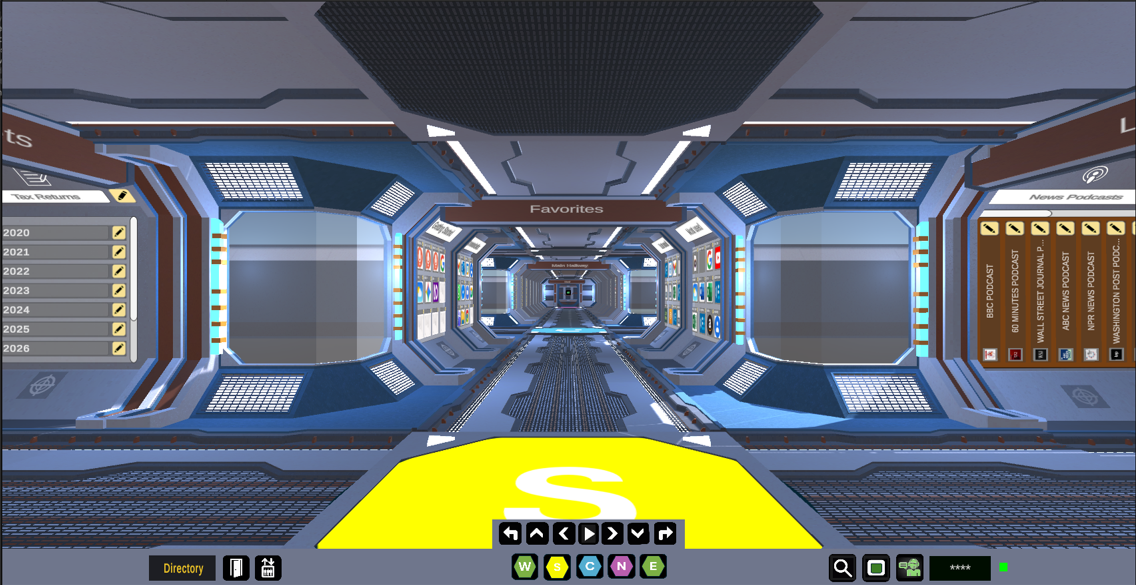
An old idea: the method of loci
Two and a half thousand years ago, Greek and Roman orators memorized long speeches by imagining a building they knew well and placing each idea in a room along the way. To remember, they simply walked through the building in their mind. This is the method of loci, the memory palace, and memory champions still use it today.
It works because we remember places far better than lists. You may forget what a file was called, but you rarely forget where the kitchen is.
Hallways turns that idea into the way you use your computer.
How it works
Your palace has floors, hallways and rooms. Rooms have walls, and walls hold panels of portals. Each portal opens something: a program, a document, a folder, a website, a book, a photo album, a contact.
- Say
goto Library
, and you are in the Library. - Say
goto BARD Bookshelf
, and you are standing in front of your books. - Say
open
, and your book starts reading where you left off.
Hallways tells you where you are as you move, and you can step closer, step back, or look around a room to hear what is on its walls. The keyboard and mouse work too.
For everyone
If you are blind or have low vision
A structure you can hold in your head instead of lists to scroll through. Spoken orientation everywhere, and voice commands for nearly everything. Hallways works alongside NVDA and stays quiet when you switch to another program.
If you are sighted
Your things where you left them, at a glance and by voice. No more hunting through folders or a crowded desktop: say where you want to go, or click the portal you can already see.
What you gain
Memory
Things are remembered by where they are, not by what they were called or which folder they were saved in.
Speed
One phrase takes you to what you want. No menus, no searching, no scrolling.
Always the same desktop
Your palace is the same on every Windows computer you use: same rooms, same panels, same portals.
Calm and predictable
Nothing moves unless you move it. The layout you learn today is still there tomorrow.
Everyday stations
Writing, mail, contacts, planning and settings each have their own alcove, ready to use.
Books and photos
Read your BARD books from a portal, and have your photos described aloud.
Help shape Hallways
Hallways is in early testing on Windows 10 and 11. We are looking for people, sighted or not, who would like to try it and tell us what they think.
Become a tester